
As we face some unprecedented times with COVID-19, Aptica is becoming increasingly aware of some of our clients having their employees work from home. We understand that for many of our clients, this is a temporary situation that will hopefully end once we can resume working at our offices. For some, however, there may be employees who may want (or need) to work remotely, long term. Regardless, we felt it necessary to bring some best practices to the table, to help protect our clients and their employees as they work from home.
In this guide, we are going to cover some strategies that you can use to help secure your home network. Below are three recommendations with detailed instructions on how to complete each. We are also developing a strategy we will provide an extension of your business network in the home, allowing you to securely connect back to your business with equipment that will be installed in your home and then managed by Aptica.
Please note: Aptica does not support home networks. Aptica only directly supports technology belonging to the businesses we have active managed-service agreements with.
1. We recommend that you change the default Administrator credentials and the Wireless (WiFi) credentials on your router.
a. Why: While never changing credentials may be the easiest option, it is the least secure. Leaving default credentials in place allows hackers or malicious actors to easily gain access to your home network. Once they gain access, they can perform nearly any kind of attack against your devices and information, or use our network to perform illegal activities (e.g. torrenting illegal movies, downloading pirated software, accessing illegal adult content, etc.)
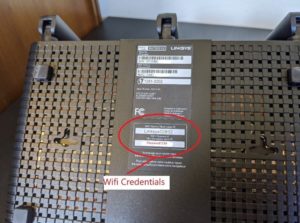
b. How: If you look at your router, you will often find one or both of these credentials on the bottom side. Below are some pictures of commonly found routers you could purchase at our local retailers.
i. Linksys
ii. Netgear

If you cannot find these “Admin Credentials” on your router, we recommend searching Google for them or looking at the manufacturer’s website. For example, the router above is a Netgear R7000. Here are the results that Google will show if we search “Netgear R7000 router credentials.” It is convenient to be able to search for this on Google, so you can imagine how easily someone trying to hack your network can do the same! In fact, most hackers will have a database full of default admin credentials for common home networking equipment.
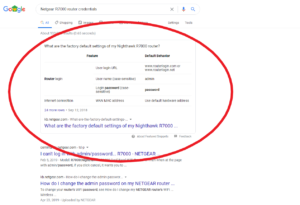
iii. In this scenario, it took me directly to the link I needed. The search terms of “your brand of router” and “router credentials” can be very helpful in your search. Once you have these admin credentials, you can log into your router to change these passwords.
iv. Please note: if you have a router provided by your Internet Service Provider, they may have their own documentation as well. In some cases, they can even assist you in changing these passwords, step-by-step. Take advantage of this if it is available to you. When you call, please ask them about changing the Administrator credentials and Wireless (WiFi) credentials of your router.
v. In the links below, we provide instructions from the manufacturers of some common devices. One of these links should help get you started changing passwords. If you don’t see our device’s manufacturer listed, a Google search like the one above should get you on the right track.
vi. Changing Admin passwords
- Netgear: https://kb.netgear.com/20026/How-do-I-change-the-admin-password-on-my-NETGEAR-router
- Linksys: https://www.linksys.com/us/support-article?articleNum=136612
- TP-Link: https://www.tp-link.com/us/support/faq/73/
- DLink: https://eu.dlink.com/uk/en/support/faq/routers/mydlink-routers/dir-810l/how-do-i-change-the-wifi-password-on-my-router
vii. Changing Wireless (WiFi) passwords
- Netgear: : https://kb.netgear.com/23439/How-do-I-change-my-NETGEAR-router-s-WiFi-password-or-network-name-SSID
- Linksys: https://www.linksys.com/us/support-article?articleNum=135554
- TP-Link: https://www.tp-link.com/us/support/faq/399/
- DLink: https://eu.dlink.com/uk/en/support/faq/routers/mydlink-routers/dir-810l/how-do-i-change-the-wifi-password-on-my-route
2. Aptica recommends that your new passwords match our basic complexity requirements, and we recommend using a service like LastPass to store them.
a. Why: We recommend storing then in a password manager so that they are easily remembered in a format that cannot get accidentally thrown away or damaged (like a piece of paper can.)
b. How: We recommend making these passwords at least 13 characters in length, also containing a number, uppercase letter, lowercase letter, and a special character. Once this secure password is created, we would like for you to store it securely. A LastPass account is free for one home user, or if you want to get a premium account, they start at $3/month. For most home users, their free account will be adequate. Click on the link below to see their plan offerings and get started. https://www.lastpass.com/plans.
3. If your equipment is more than 4-6 years old, it may be time to upgrade.
a. Why: We recommend that the home routers that remote employees use be no older than six years. After six years, it is common that manufacturers will no longer support the device, therefore they will not provide any software updates, leaving you vulnerable to attacks.
b. How: We recommend that you visit local retailers if that is possible where you live, considering government restrictions. Many of them, such as Best Buy, have an order online/pick up locally option. This is what we recommend. Many of the Netgear, Linksys, TP-Link, and other name brand devices will be secure and reliable enough for your remote work. Please note: if your router was provided to you by your Internet Service Provider, speak with them about a replacement device. If they cannot/will not offer to replace, please ask for their recommendations before purchasing your own. You may not be able to do so without their assistance.
Jason Newburg, 260.243.5100, ext 2101, is the founder and owner of Aptica LLC. This IT management and support company has been serving small to medium-sized businesses for 19 years in the region that includes Angola, South Bend, and Fort Wayne, IN, Battle Creek, MI, and Toledo OH.